DMX lighting console for Windows 10 and 11

A lighting console for theatre,
concerts
and festivals.

tomic.lighting is console software with the workflow of a full-size desk: a GDTF-based patch, a programmer, groups, reference palettes, cues and sequences on faders, a BPM-driven effects engine and timecode with an audio track. It runs up to four screens at once, and for output a laptop with an Art-Net/sACN node or a USB DMX interface is all you need.

The free version covers 2 DMX universes with no time limit; the Premium license covers 4 universes from €40 per year — details on the pricing page.

Key strengths

Built for professional operation.

Four areas where Tomic goes further than a typical software console.

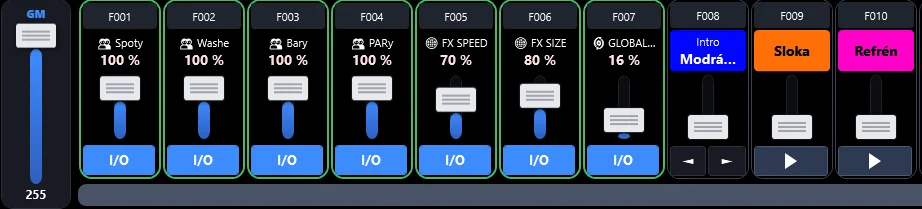
Group faders

Every group's intensity on its own fader.

A Group intensity fader acts as the group's submaster: it brings up a group that is not playing and works as a ceiling for running cues and effects — they keep going, just at the set level.

  • Flash with fade-in and fade-out, Solo mode and an Ignore RELEASE option
  • A fader can also drive a group channel (such as a hazer fan) or a group + palette crossfade
  • The same level on the fader, in the Live cell and on the X‑Touch motorised fader
  • REC in timecode captures the movement and fades; a song can set group levels when loaded
Group faders in detail →
tomic.lighting faders: group faders for Spots, Washes, Bars and PARs, FX speed, FX size, Global fade and the sequences Intro, Verse and Chorus
Faders — intensity of the Spots, Washes, Bars and PARs groups, effects and sequences
Timecode

Shows on an audio track, recorded from the console.

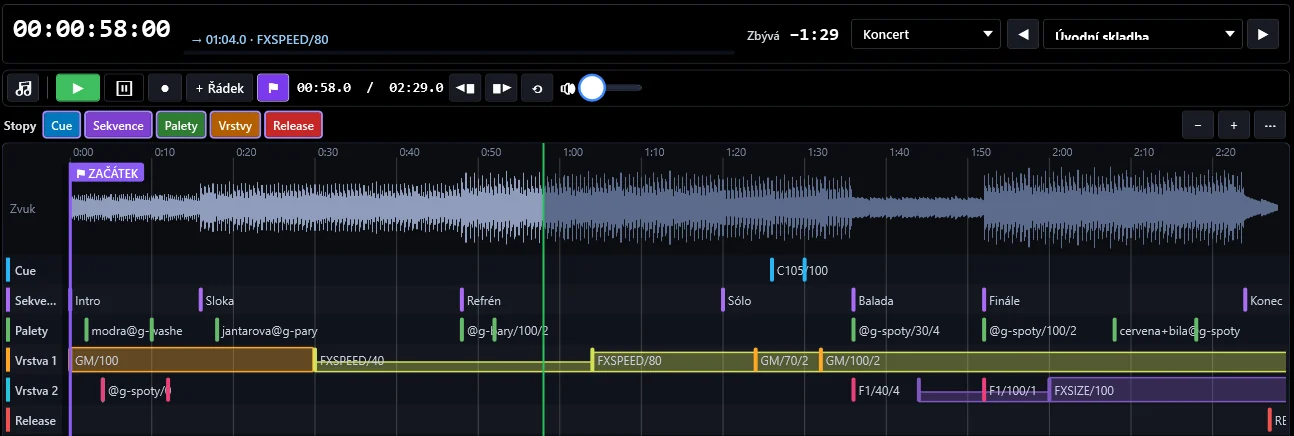
Load an MP3 or WAV file into a song, play the show by hand and REC captures everything you do on the desk. Refine the result by dragging in the song diagram.

  • Song diagram: Cue, Sequence, Palette tracks, two level layers and Release with colour-coded curves
  • Move events by dragging, add fades with a handle, set the timecode zero anywhere in the recording
  • Automatic or manual: a song follows external LTC or MTC from the sound department (licensed), or you start it with GO and it runs on the internal clock
  • Rows without a time wait for the operator’s GO, and MANUAL mode steps through rows one at a time — the show follows the music while staying under your control
  • Playlists and song default values (tempo, masters, group levels)
Timecode in detail →
Song editor in tomic.lighting: audio waveform and the Cue, Sequence, Palette, Layer 1, Layer 2 and Release tracks
Song editor — timeline with audio track and diagram
Live panel

A busking surface built your way.

Your own cell layout across multiple pages: palettes on groups, palette banks, cues and sequences, group intensities and masters. Lock the layout and the surface is ready for the show.

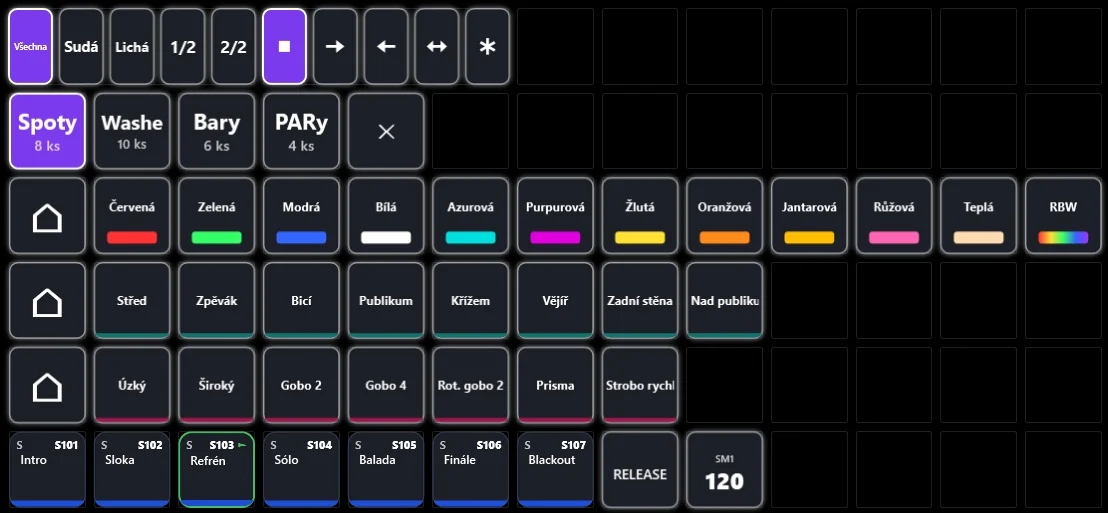
  • S, M and L cells, Text cells for block headings, a look consistent with the rest of the app
  • Subselection (even, odd, halves) and spread direction (left, right, from centre, random)
  • Global fade drives colour and position transitions; PRESET prepares the next scene off output
  • A page on every screen and tablet, a Stream Deck page, recording into timecode
Live in detail →
Live panel in tomic.lighting: subselection, spread direction, groups, colour, position and beam palette banks and sequences
Live panel — demo show
Controller support

Physical control without extra software.

Elgato Stream Deck directly over USB without the Elgato app, Behringer X‑Touch with motorised faders, Novation Launchpad, OSC and a phone or tablet as a controller.

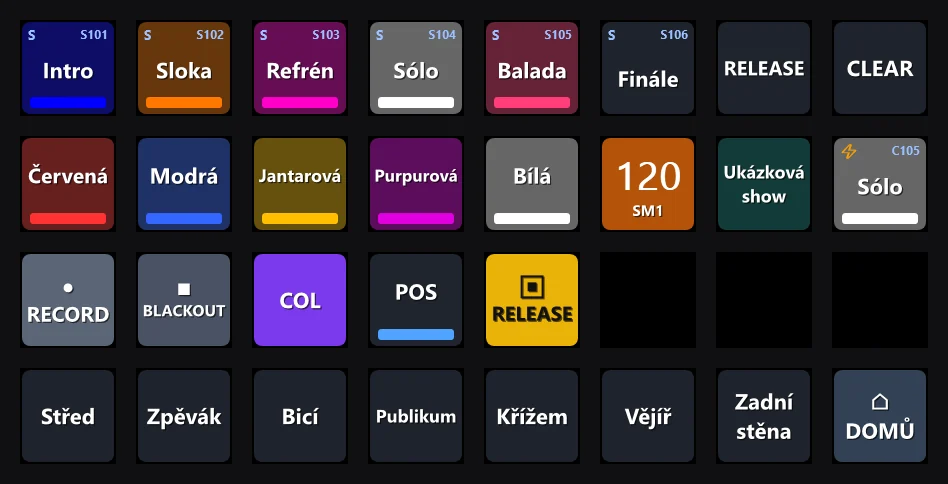
  • Stream Deck: an editable home screen and an 8 × 4 page in Live
  • X‑Touch: faders of the active page, Grand Master, name displays and button mapping
  • Phone: position, beam, palettes, faders and Live in the browser; a tablet as another screen
Controllers in detail →
Stream Deck page in tomic.lighting: sequences, colour and position palettes, speedmaster and action keys
Stream Deck 8 × 4 page as rendered by the app

Further capabilities

Tomic drives up to four screens at once — monitors and tablets — and RECORD, DELETE and MOVE act in the window you are working in. Effect speed is set in BPM, tempo is driven by speedmasters with tap tempo or beat detection, and movement effects continue smoothly from the current position. The Take over from another show wizard brings fixtures, groups, palettes, cues, sequences and timecode over from another file, Swap type… replaces a fixture profile while keeping the programming, and DMX is calculated on a dedicated thread independent of the interface. Output goes via Art-Net, sACN or USB DMX — two universes in the free version, four with a license (2,048 channels). The complete overview is on the Features page, step-by-step procedures in the guide.

Versions

Start for free.

The free version contains the complete desk. The Premium license extends it for larger rigs and professional work.

Free version

All features. Free of charge, with no time limit.

The free version is not a demo: it contains the complete console with no watermark and no trial period.

Fully included

  • Group faders, Live panel with custom layouts and pages
  • Timecode with an audio track, REC recording, song diagram and playlists on the internal clock
  • Effects in BPM, speedmasters, tap tempo and beat detection
  • Stream Deck, X‑Touch, Launchpad, OSC, phone and tablet
  • Up to four screens, GDTF patch, profile editor, RDM
  • Output via Art-Net, sACN and USB DMX, updates

Limits

  • 2 DMX universes (1,024 channels)
  • 99 fixtures
  • 99 cues
  • 99 sequences

Groups, palettes and faders are unlimited. The free version is intended for non-commercial use.

Download the free version
Premium license

Need more?

The Premium license extends the same desk for larger rigs and professional work.

  • 4 DMX universes (2,048 channels) and Art-Net universe mapping
  • No limit on fixtures, cues and sequences
  • LTC and MTC timecode input — sync with the sound department
  • Commercial use — paid shows, agencies, rental companies
  • Personal technical support

Shows created in the free version open in the Premium version without conversion.

Pricing and ordering →